
Build Usable 3D Assets Using AI 3D Model Generator with Clean Meshes
Topology is an indicator of a 3D asset’s efficiency in pipelines. Well strcutured meshed leads to negligible errors in the final rendering process. Structured geometry is the basis of streamlined workflows for today’s creators. Tripo 3D helps accelerate mesh generation using powerful topology. It enhances asset quality and cuts down on manual modeling work across industries and production stages.
Understanding the Importance of Production-Oriented Assets Topology
Topology is the shape of the 3D model polygons and edge flow. It defines the behavior of surfaces when they are animated or interacted with. Predictable movement and cleaner results in complex scenes are the result of good topology. The topology is bad, causing shading issues and limiting the models. Optimized topology also boosts rendering speeds and responsiveness of the viewport. It helps to make smoother integration into game engines and simulation environments. Tripo 3D helps in the consistency of the structure of generated assets. It minimizes the amount of hand-correcting needed at later stages in production. Long-term usability of digital assets in the context of changing workflows is ensured with clean topology.
Common Topology Challenges in Traditional Modeling
Some of the issues of traditional modeling techniques are inconsistent edge flow and uneven distribution of polygons. The higher the geometry, the more the performance will decrease, and it will be more difficult to edit. Retopology is a lot of work and know-how. An artist may have bottlenecks when they are trying to optimize the assets for animation or real-time use. There are many workflows that waste time fixing errors and inconsistencies in the mesh structure. The AI 3d model generator can alleviate these obstacles by automatically generating structured basic geometry. This enhances start quality and cuts down on manual clean-up. But there are still improvements to be made for traditional pipelines for the production of a high-end product. Complex models also lead to unnecessary calculations in real-time applications. These issues result in longer iteration cycles and creative exploration on production systems.
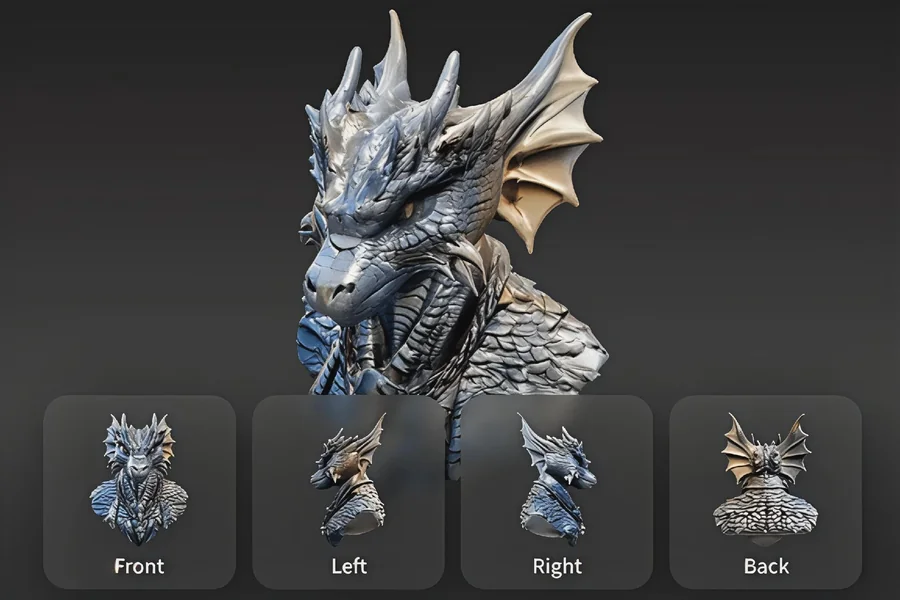
How AI 3D Model Generator Produces Clean Mesh Structures
Modern AI systems process shape patterns, and logic is used to reconstruct geometry. They evenly spread polygons over surfaces to create an even distribution of meshes. Edge loops are set up to be able to be manipulated and sculpted. The system is based on the transparency of form and uniformity of structure. It does not include any unnecessary geometry clutter, but retains essential details. Tripo image to 3d workflows enable the fast conversion of the visual input to structured meshes, with the help of AI-driven reconstruction. Tripo 3D guarantees a clean output topology. It also creates mesh structures that can be edited and are proportional. These features significantly reduce the amount of manual modeling time and increase the modeling pipeline’s production turnaround.
Features That Support High-Quality Topology Generation
To enhance the quality of topology during the process of generating, The Tripo image to 3d provides some features. Topology options based on quads for cleaner deformations in animation workflows. Triangle-based outputs have been used to support game engine compatibility and real-time rendering. Polycount can be customized to regulate performance and the amount of detail. Geometry refinements after generation. Exports to the industry software for smooth transfer. There is also support for structured UV layouts for texturing efficiency. More realistic surface with PBR materials. Every feature is geared toward production. These features enable creators to create assets that seamlessly integrate into intricate pipelines with minimal modifications.
Steps to Build Usable 3D Assets Using an AI 3D Model Generator with Clean Meshes
Clean Mesh Production Workflow
Step 1: Production Model Initialization
- First access Tripo 3D and signup. Then go to the “Model” tab in the vertical left menu bar.
- Select “HD Model” to begin high-quality production modeling.
- Upload reference images using drag-and-drop or the “Upload”
- Or use “Text to model” for procedural model generation.
Step 2: Clean Topology Configuration
- In “General settings”, turn on “AI complete” for automated clean mesh generation.
- Adjust “Texture Quality” to meet production standards like 2K, 4K, or 8K.
- Enable “PBR” for physically accurate material output.
- Choose “Quad” for clean deformation-ready topology or “Triangle” for rendering pipelines.
- Select v3.1 best quality, v3.0 fast and balanced, or v2.5 legacy, depending on production stage.
- Activate “Generate in Parts”, “8K Texture”, and “Privacy” for controlled production workflows.
- Click “Generate Model” to create a clean, editable assets topology.
Step 3: Final QA, Refinement, and Export
- Inspect model using “Solid View”, “Cartoon Style”, “Sketch Style”, “Hologram Style”, or “Unlit” and apply “Refine” if needed.
- Manage scene setup through “Environment Settings” and adjust the view using “Reset Camera”.
- Optionally validate physical output using “3D Print”.
- Export final model via “Export”, choose resolution, format, and file name, then confirm with “Export”.
Why Clean Meshes Improve Production Pipelines
Clean meshes make for a much-improved editing efficiency in production. They minimize the time spent correcting geometry problems and re-structuring models. Improved animation preparation thanks to more predictable deformation behavior. This aids in smoother rigging workflows and better character movement. The polygon distribution is also optimized for the rendering performance. The more complex the scene, and the bigger the project, the more responsive the scene will be. It is easier to make files compatible with different software applications. This fits in nicely with text to 3d model generation workflows in today’s pipelines. Structured models are able to be edited over time, thus giving assets longevity. Clean topology results in fewer technical complications in the iteration and deployment stages.
Using Generated Topology Across Multiple Industries
- Real-time performance models are created to optimize the making of gaming assets.
- Smooth character movements during animation production are provided by clean rigs.
- Visualization of products helps to deliver accurate design presentations and reviews.
- Lightweight and structured assets are needed for AR and VR development.
- Spatial visualization and accuracy of modeling the interior and exterior of architectural structures.
- The watertight mesh is crucial for the 3D printing process as it ensures correct physical output.
Preparing AI-Generated Meshes for Professional Production
Quality assessment helps to ensure that models generated are up to production standards before being used. The mesh inspection is a tool that can be used to find any inconsistencies in the structure early on. Edge flow and surface accuracy are enhanced using refinement tools. The visual realism and material depth are enhanced by texturing preparation. Pipeline integration for industry tools and engines. Lighting tests are used to ensure that rendering works under different lighting conditions—optimization – geometry reduction for balance of performance. Version control keeps track of asset improvements in development cycles. Export settings for the correct format for final use. The following measures guarantee that the AI-produced resources can be expertly implemented.
Conclusion
Topology is a key component of a successful 3D production workflow. The application of a clean mesh structure can improve the efficiency of pipelines by reducing the extra cleaning and errors. Easy asset creation with automated and structured generation systems with Tripo 3D’s. It offers prototype-ready models for different industries and applications. AI topology generation can streamline the iteration process and boost creativity in today’s modern 3D development environments.






One Comment